

Summary
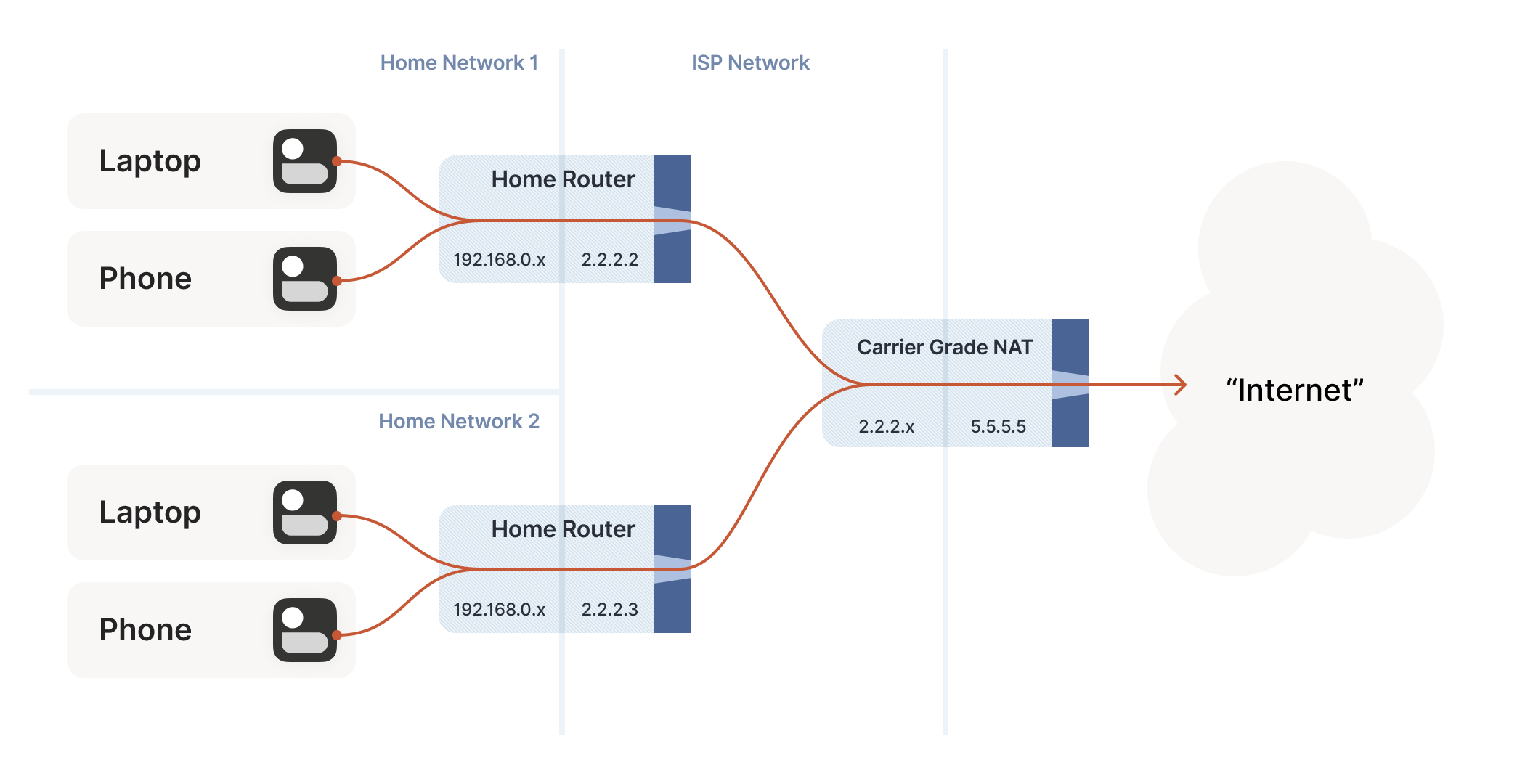
My ISP stopped providing me with a public IPv4 address years ago, and ever since, CGNAT has been one of the biggest limitations in my home lab. Tailscale solved private remote access so effectively that I rarely thought about the problem anymore. However, Tailscale intentionally leaves out one important capability: direct public ingress that allows services to see the actual IP address of incoming clients.
Funnel supports HTTPS only, and traffic arriving through relays or proxies is logged using the tunnel’s address rather than the client’s real IP. As a result, tools like fail2ban, intrusion detection systems, and geo-blocking lose access to meaningful client information.
To solve that limitation, I built my own solution using a WireGuard tunnel connected to an Oracle Cloud Free Tier virtual machine. After only a few hours of setup, my services running behind CGNAT were once again logging real client IP addresses, thanks to a simple but effective iptables configuration.
Oracle Cloud Free Tier Is Excellent Once You Know the Pitfalls
Two Firewalls, One Checkbox, and an MTU Trap
Oracle’s Always Free tier provides a VM.Standard.E2.1.Micro AMD virtual machine with a permanent public IPv4 address at no cost. That public IP alone makes the service valuable, considering IPv4 scarcity is one of the primary reasons ISPs rely on CGNAT.
I intentionally selected the small x86 instance instead of the more powerful Ampere A1 option because Arm-based instances often suffer from limited availability across many regions. For a lightweight WireGuard relay, additional processing power simply wasn’t necessary.
One recommendation is to upgrade the account to Pay As You Go while setting a budget alert of $1. Upgrading prevents Oracle from reclaiming idle virtual machines, while the budget notification provides protection against unexpected charges.
The deployment process was mostly straightforward, although a few mistakes slowed me down.
During instance creation, I accidentally skipped the Assign a public IPv4 address option. Fortunately, because the VM was deployed inside a public subnet, assigning an address afterward was still possible. Even recreating the instance would only have taken a few minutes.
The next challenge was Oracle’s dual firewall system.
Oracle requires firewall rules in two separate locations:
- The cloud-side Security List
- The Ubuntu VM’s built-in iptables firewall
By default, the Ubuntu image blocks every incoming connection except SSH, so matching rules must exist in both firewalls before any port becomes accessible.
Another issue involved the default network configuration. Oracle’s Ubuntu image uses an MTU of 9000, which causes WireGuard to fail silently unless the tunnel MTU is explicitly set to 1420.
There was one additional surprise: the default IPv6 firewall configuration is effectively empty. That isn’t an issue if you’re using IPv4 exclusively, but it’s something to keep in mind before enabling IPv6.
Each of these problems takes only a few minutes to fix—provided you know they exist. Otherwise, they can easily consume hours of troubleshooting or introduce unnecessary security risks.
Why DNAT Without SNAT Is the Missing Piece
Let Your Firewall See Real Client IP Addresses
Most WireGuard port-forwarding tutorials follow the same approach, but nearly all of them introduce an unnecessary compromise.
The typical configuration adds a masquerade rule to the tunnel interface, rewriting the source address of every incoming connection. As a result, every client appears to originate from the tunnel gateway—for example, 10.66.66.1.
That behavior breaks several important security features:
- fail2ban cannot identify attackers.
- Log files lose the original client IP.
- Abuse reports become meaningless.
- Geo-blocking no longer works correctly.
The masquerade rule isn’t actually required.
It merely compensates for a routing problem that can be solved properly using policy routing. I discovered the solution in a GitHub gist published by pituluk.
On the VPS, only the destination address needs to be rewritten. Incoming packets are forwarded into the tunnel while preserving the original source IP.
# On the VPS (wg0.conf) — DNAT only, no SNAT
PostUp = iptables -t nat -A PREROUTING -p tcp -i ens3 --dport 25565 -j DNAT --to-destination 10.66.66.2
PostUp = ip -4 rule add iif wg0 table main
The second half of the solution runs on the home server.
Without additional routing rules, reply traffic would leave through the normal CGNAT connection using the wrong source address, causing every connection to fail. That limitation is why many tutorials rely on masquerading.
Instead, configure the WireGuard client to route only reply traffic back through the tunnel.
# On the home peer
Table = off
PostUp = ip route add default via 10.66.66.1 dev wg0 table 123
PostUp = ip rule add from 10.66.66.2 lookup 123
This configuration keeps all other traffic using the standard internet connection.
There is:
- No full-tunnel routing.
- No masquerading.
- No loss of source IP addresses.
And most importantly—it works.
I tested the setup by connecting from my phone over a cellular network to the VPS while monitoring logs on a container hosted behind CGNAT in my office.
Initially, the logs showed:
172.225.30.89 - - [26/Jul/2026 09:41:12] "GET / HTTP/1.1" 200I expected to see an IP address assigned by my cellular provider, but whois identified the address as belonging to Akamai Technologies.
The explanation was simple: iCloud+ Private Relay was enabled on my iPhone, routing traffic through Akamai’s infrastructure.
After disabling Private Relay, my logs immediately showed an address from my T-Mobile network.
To verify the difference, I temporarily re-enabled the masquerade rule. The following request appeared as 10.66.66.1, confirming exactly how SNAT hides real client identities.
An interesting side effect also became apparent.
With Private Relay enabled, consecutive page requests originated from two different Akamai IP addresses within a single second because the service assigns different egress IPs per connection.
Any security system that assumes a single visitor always uses one IP address can easily be confused by this modern privacy feature.
Adding New Port Forwards Is Quick and Simple
Almost as Convenient as a GUI
Once the initial setup is complete, forwarding additional services becomes a straightforward process.
Every new port requires updates in only two locations.
The first step is adding an ingress rule to Oracle’s Security List, allowing traffic from 0.0.0.0/0 for the desired protocol and destination port.
The second step is duplicating the existing DNAT rules inside wg0.conf and replacing the protocol, port, and destination values.
PostUp = iptables -t nat -A PREROUTING -p <protocol> -i <interface> --dport <port> -j DNAT --to-destination <destination>
PostDown = iptables -t nat -D PREROUTING -p <protocol> -i <interface> --dport <port> -j DNAT --to-destination <destination>
After restarting the tunnel with:
sudo systemctl restart wg-quick@wg0the new port becomes available immediately.
Interestingly, no changes are required in the VPS INPUT chain.
Forwarded packets never reach it.
Because DNAT occurs before routing decisions are made, packets move directly through the FORWARD chain into the WireGuard tunnel. The INPUT chain only handles services hosted directly on the VPS itself, such as the WireGuard listener.
CGNAT Is Still a Limitation—But the Solution Is Free
The finished architecture is surprisingly clean.
Traffic flows from any internet client to Oracle’s free virtual machine, through a WireGuard tunnel initiated from my home network, and finally reaches services running behind CGNAT—all without modifying my router configuration.
Most importantly, those services now record the real client IP address instead of a proxy or tunnel address.
Routing traffic through Oracle’s Ashburn data center adds only about 8 ms of latency, which is effectively negligible. The tunnel also survives reboots on both systems without requiring manual intervention.
Tailscale remains an essential part of my setup for secure private access, and I would still recommend it as the first choice for remote connectivity.
This solution addresses a different problem entirely.
When a project requires genuine public ingress with accurate client IP visibility, this WireGuard and Oracle Cloud Free Tier setup provides an effective way to bypass CGNAT without paying for a public IPv4 address.