

Summary
I believed I had a solid understanding of everything inside my home—until I actually needed to find something. Spare cables disappeared into drawers, groceries expired unnoticed at the back of cabinets, warranty documents became impossible to locate, and duplicate purchases slowly accumulated without me realizing it.
A spreadsheet might have solved part of the problem, but keeping it updated manually felt like another household task I would eventually stop doing. Everything changed when I deployed Grocy as a Docker container.
I Thought I Knew What I Owned
It Was More Difficult Than I Expected
The turning point came during a routine shopping session. I was about to order another pack of batteries when I found an unopened one hidden in a drawer. A few days later, I experienced the same issue with charging cables. Then it happened again with cleaning supplies, light bulbs, and several pantry essentials.
My memory was reliable enough for the items I used daily. I always knew where my laptop charger was or how much milk remained in the refrigerator. However, anything stored for occasional use quickly disappeared from my mental inventory. At that point, I realized I needed a better solution than simply reorganizing shelves again.
Deploying Grocy with Docker
A Native Windows App Is Also Available
Since Docker was already running on my home server, deploying Grocy was the most practical choice. Instead of installing another application on my primary computer, I could keep it running quietly in the background and access it from any device connected to my local network.
After mapping the required port and configuring persistent storage for the database, Grocy became accessible through any standard web browser.
That flexibility was one of the biggest advantages of using Docker. I could manage my inventory from my Windows desktop while entering multiple items, then switch to my phone whenever I needed to check the contents of a cupboard.
Docker isn’t the only deployment option, however. Grocy also offers a dedicated Windows desktop application, making it much easier for anyone who wants to try the platform without setting up a self-hosted environment first.
Grocy Offers More Than Inventory Management
A Feature-Rich Household Management Tool
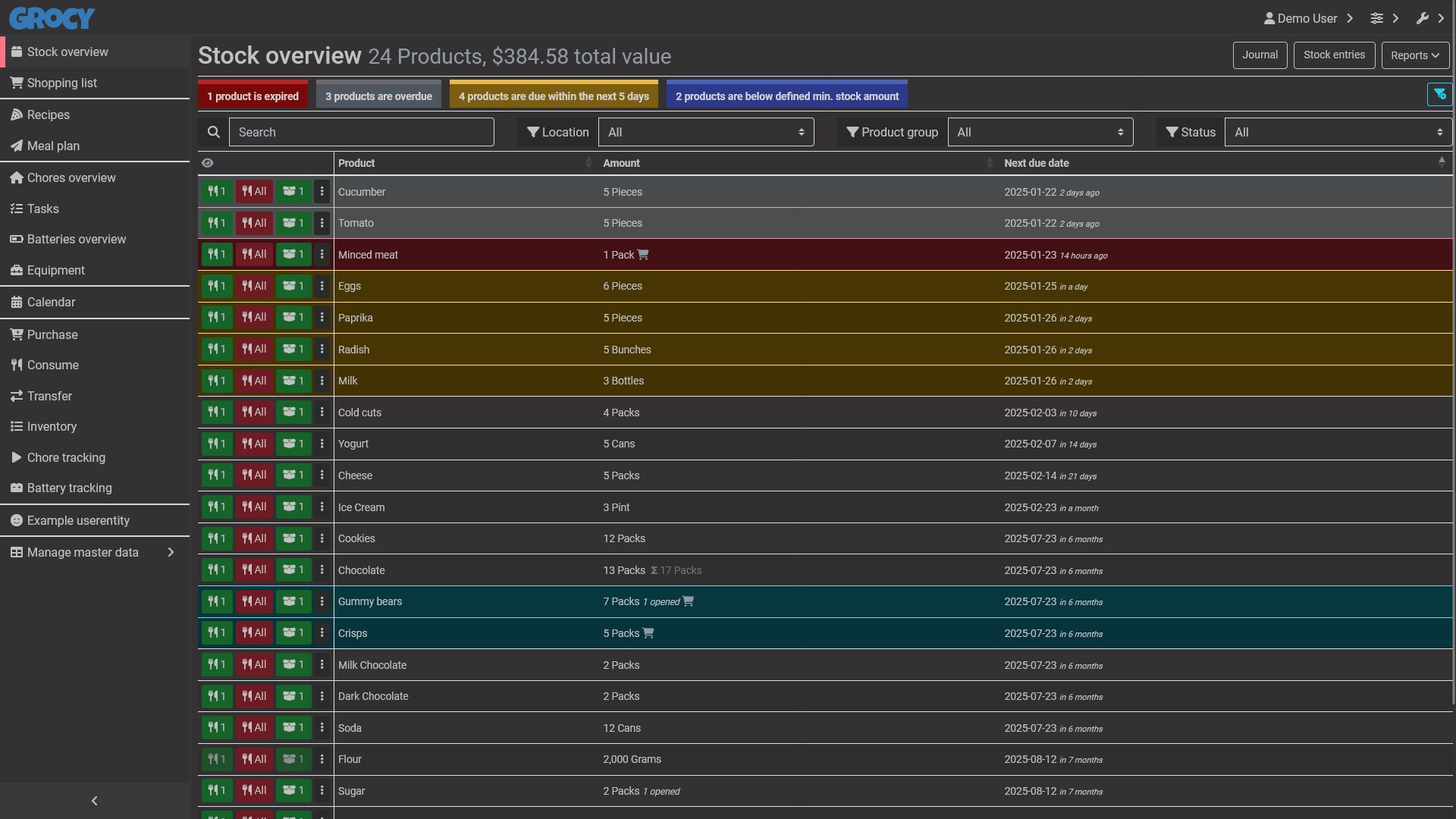
I originally installed Grocy simply to organize the items around my home. After spending more time exploring the dashboard, I realized inventory management was only one part of what the platform offers.
Beyond tracking household items, I could:
- Create shopping lists.
- Monitor products that were running low.
- Track expiration dates.
- Record exactly where each item was stored.
Another standout feature was the Chores module. It allowed me to schedule recurring household tasks, assign due dates, and log when each task was completed. It proved especially useful for responsibilities that are easy to forget, such as cleaning filters, inspecting appliances, watering plants, or replacing household items on a regular schedule.
Grocy can also manage equipment, batteries, and maintenance records. I found it particularly helpful for documenting which battery belonged to which device and tracking when specific household equipment required maintenance.
The more I used Grocy, the more its value became clear.
Instead of relying on scattered notes, reminders, and memory, I finally had one centralized location for managing all the small details involved in running a home.
Recipe Planning Became an Unexpected Favorite
My Home Finally Felt Organized
Recipe management wasn’t the reason I installed Grocy, but it quickly became one of the features I relied on most.
I could save recipes, link ingredients directly to products already stored in my inventory, and instantly see what meals I could prepare without checking every cabinet manually.
It also became much easier to identify missing ingredients, since I could add them directly to my shopping list instead of maintaining a separate note.
The built-in meal planner added even more value. Grocy includes a calendar that lets me schedule meals for specific days, giving me a clear weekly overview of everything I plan to cook.
Before using Grocy, I relied on Mealie, another Docker container dedicated to recipes and meal planning. Although Mealie offers a more polished interface and a stronger focus on recipes, I eventually stopped using it because Grocy covered everything I needed.
Keeping recipes, groceries, shopping lists, and meal plans inside a single container proved far more convenient than maintaining two separate services.
My only significant criticism is the user interface. While Grocy is highly functional, some areas feel outdated, and the dashboard can become overwhelming when multiple modules are enabled. The menus, forms, and overall design would benefit from a modern visual refresh.
Grocy Brought My Home Inventory Under Control
Grocy didn’t reduce the number of items I owned, but it completely transformed how I managed them.
I no longer rely on memory to keep track of supplies, locate infrequently used items, or remember what needs replacing.
Everything now has a digital record, and that added layer of organization has made my entire home easier to manage.
The initial setup requires some patience—especially if you’re cataloging a large household—but the system becomes more valuable with every item you add.
If Grocy doesn’t meet your needs, Homebox is another capable Docker-based home management solution worth considering.