

Summary
There’s no question that modern high-end graphics cards are the ideal hardware for running large language models, particularly when you need fast, accurate inference for demanding productivity tasks. However, not every AI workload requires a powerful GPU server. That became clear after I built a fully local LLM-powered workstation using nothing more than a Raspberry Pi.
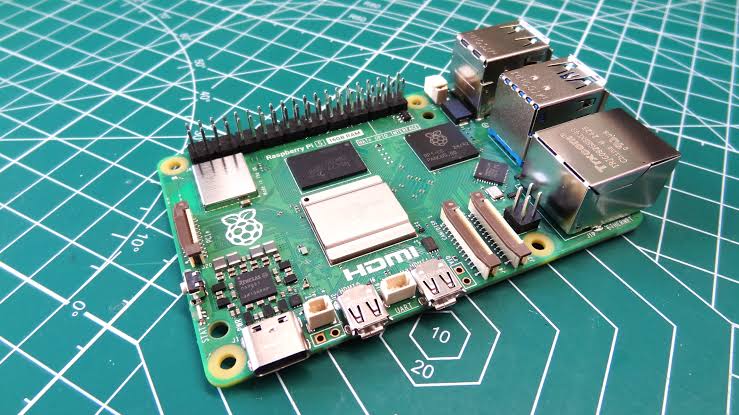
I’ve previously hosted lightweight speech-to-text and text-to-speech models on basic virtual machines without GPU passthrough, and the inference performance was surprisingly good. That experience sparked an idea: if those models could run efficiently on modest hardware, why not build a complete offline voice assistant powered entirely by a Raspberry Pi 5?
Choosing llama.cpp as the Core of the Voice Assistant
Qwen3.5-2B offered the best balance between speed and accuracy
Because the Raspberry Pi’s ARM-based hardware has limited resources, minimizing performance overhead became my top priority.
To keep resource usage as low as possible, I installed the Lite version of Raspberry Pi OS, which removes the graphical interface and unnecessary packages while maintaining better compatibility than ultra-lightweight Linux distributions like Alpine Linux.
Although Ollama would normally be my preferred choice for running local LLMs, I decided against it because it introduces additional performance overhead. Instead, I manually compiled llama.cpp directly on the Raspberry Pi to maximize efficiency.
At one point, I even considered using the RPC functionality in llama-server to connect multiple Raspberry Pi boards into a small inference cluster. Having experimented with that setup before, I quickly abandoned the idea after realizing that the relatively slow LAN connectivity between the boards significantly reduced inference performance.
That limitation also meant my Raspberry Pi 5 with 8GB of RAM could realistically handle models no larger than approximately 5B, or at most 6B, parameters.
My first choice was Gemma 4 E4B, the same model that had previously rescued another Raspberry Pi project of mine. While the model performs surprisingly well on edge hardware, its token generation speed averages only around 2–3 tokens per second, making it too slow for a responsive voice assistant.
I eventually settled on Qwen3.5-2B, which delivers noticeably faster inference while producing fewer hallucinations than many other models in the same size category.
Speaches Handles Both Speech-to-Text and Text-to-Speech
Deployment was surprisingly straightforward
Adding voice interaction required more than just an LLM.
First, I needed a Speech-to-Text (STT) model capable of converting spoken commands into text because Qwen3.5-2B cannot process voice input directly.
Then I needed a Text-to-Speech (TTS) model to transform the LLM’s text responses back into spoken audio.
Since Open WebUI would serve as the central interface for the project, both the STT and TTS services needed to support the OpenAI API.
For that reason, I chose Speaches, the same application I previously integrated with my Open Notebook setup to generate AI-powered podcasts from written notes.
After deploying Speaches, I selected faster-distil-whisper-small.en as the Speech-to-Text model and paired it with Kokoro-82M-v1.0-ONNX for Text-to-Speech generation.
At that point, only one major component remained before the voice assistant could function as a complete system.
Open WebUI Connects the Entire AI Pipeline
One interface for every deployed model
Although llama-server and Speaches each perform their own tasks effectively, they cannot communicate directly with one another.
That’s where Open WebUI becomes invaluable. Besides offering microphone support, it can automatically play audio responses once the language model completes inference, making it an ideal control center for the entire voice assistant workflow.
Connecting llama-server was straightforward. I simply added its local IP address and port number as an OpenAPI model through the Connections section inside the Admin Settings.
Configuring Speaches required only one additional step: appending /v1 to the URLs for both the Speech-to-Text and Text-to-Speech services within the Audio settings.
The final obstacle involved browser security.
Since modern browsers block microphone access on unsecured HTTP websites, Open WebUI couldn’t access my microphone without HTTPS.
Rather than generating self-signed SSL certificates, I temporarily enabled Brave’s allow-insecure-localhost flag and restarted the browser.
Once that was done, microphone permissions worked immediately.
With every component connected successfully, I began testing the Raspberry Pi-powered assistant using a variety of random voice prompts.
Performance Was Better Than Expected
A Raspberry Pi can handle a complete AI voice workflow
During testing, faster-distil-whisper-small.en generally required between 10 and 15 seconds to convert spoken commands into text.
After receiving the prompt, Qwen3.5-2B typically needed anywhere from 15 to 45 seconds to generate a response, depending on the complexity of the request.
Finally, Kokoro-82M-v1.0-ONNX spent roughly another 10 seconds converting the generated text into natural speech.
In total, most everyday voice requests were completed in approximately one minute.
While this setup obviously can’t compete with the GPT-OSS-20B pipeline running on my RTX 3080 Ti using MoE offloading, I was genuinely impressed that a Raspberry Pi could process voice commands and generate meaningful spoken responses without forcing me to wait two or three minutes.
Technically, I could reduce processing time even further by switching to smaller 0.7B or 1.5B models.
However, my testing showed that very few lightweight models delivered consistently reliable results. Apart from Qwen3.5 1.5B and LFM2 1.2B, most smaller models struggled to provide the same level of accuracy.
For now, Qwen3.5-2B remains the best compromise between inference speed, response quality, and practical usability on Raspberry Pi hardware.